Project Atlas Logo

Project Atlas 3.5

Locksmith Tools
By Williams Lock Service


New!

Check out the new progression chart tool for automotive & much more!

Free Master Keying Tools

Generate master key systems, build pinstacks, and keep running pinout sheets in one browser-based workflow. Project Atlas is built for locksmiths, security teams, facility staff who need usable tools on desktop or mobile interchangeably without the risk of handing system data to some other company's server. It provides SSL encrypted sessions to build and manage systems on the user's end, virtually anywhere. Your system files are only saved locally, and you get the flexibility to use pretty much any device with a browser.

Generator + Calculator Create systems, review the tree, color-code key availability, and build cylinder pinning from generated systems or manual key entry.
Running Pinout Sheets Save clipboard entries with cylinder quantities and running pin count totals for live bench or field work.
Reloadable Projects JSON files restore system inputs, key status decisions, and saved clipboard work so active jobs can be reopened quickly.
Installable + Offline Ready Install Project Atlas as a web app and keep working from the counter, truck, bench, job site, or a dead zone once the app is cached.

Cached For Offline Use

Once Project Atlas has been loaded on a device and it automatically loads the last cached app version from the last connected instance, users can still operate the app, review systems, and update project files even in a dead zone because system data is only stored locally on your device, never on this server. Once viewed online it should load without internet and function normally.

Learn More

System Generation

  • Generate full systems with progression rules and MACS-aware filtering.
  • Supports common 4-7 cut manufacturers, including SFIC and LFIC DSD profiles.
  • System JSON files reopen live Atlas projects without rebuilding from scratch.

Locksmith Focused

  • Built around real system design, cylinder pinning, and update-heavy locksmith work.
  • Review generated systems in browser, color-code available, activated, and deactivated keys, and build pinstacks directly from the system tree.
  • Track cylinder quantities and cumulative pin totals as clipboard entries grow.
  • Useful for apprentices and technicians learning progression, hierarchy, and pinning logic in a free and forgiving software setting.

Export Ready

  • Export the full project zip as your primary save method so the JSON, workbook, and pinning sheets stay synchronized with ongoing edits and key status decisions.
  • Copy or download clipboard batches for bench notes, field work, or documentation.
  • Project data stays with the user, not on a hosted system database.

Practical Mobile Ready Locksmith Software For Master Key Planning And Fast Cylinder Pinning

Project Atlas keeps master key planning, cylinder pinning, running pinout sheets, and reloadable browser workflow in one place for locksmiths, facility teams, and property managers. Build or manage any time, anywhere, on any device with a browser. Once you login and load the app, the cached version of Project Atlas can continue to be used while offline until you sign out.

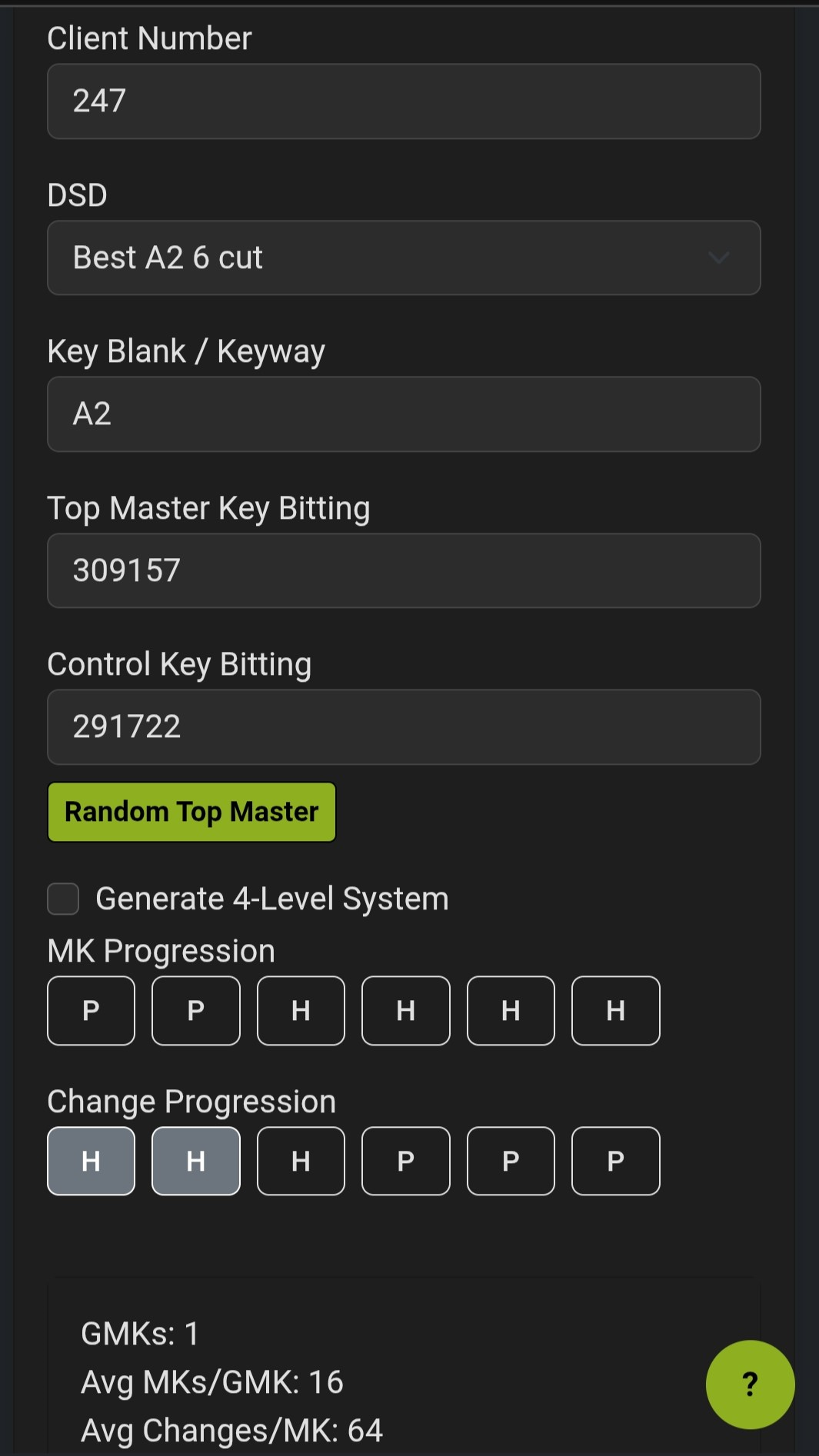
Mobile screenshot of the Project Atlas generator input and progression controls.
Generator setup stays readable on mobile while you define DSD, top master values, and progression rules.
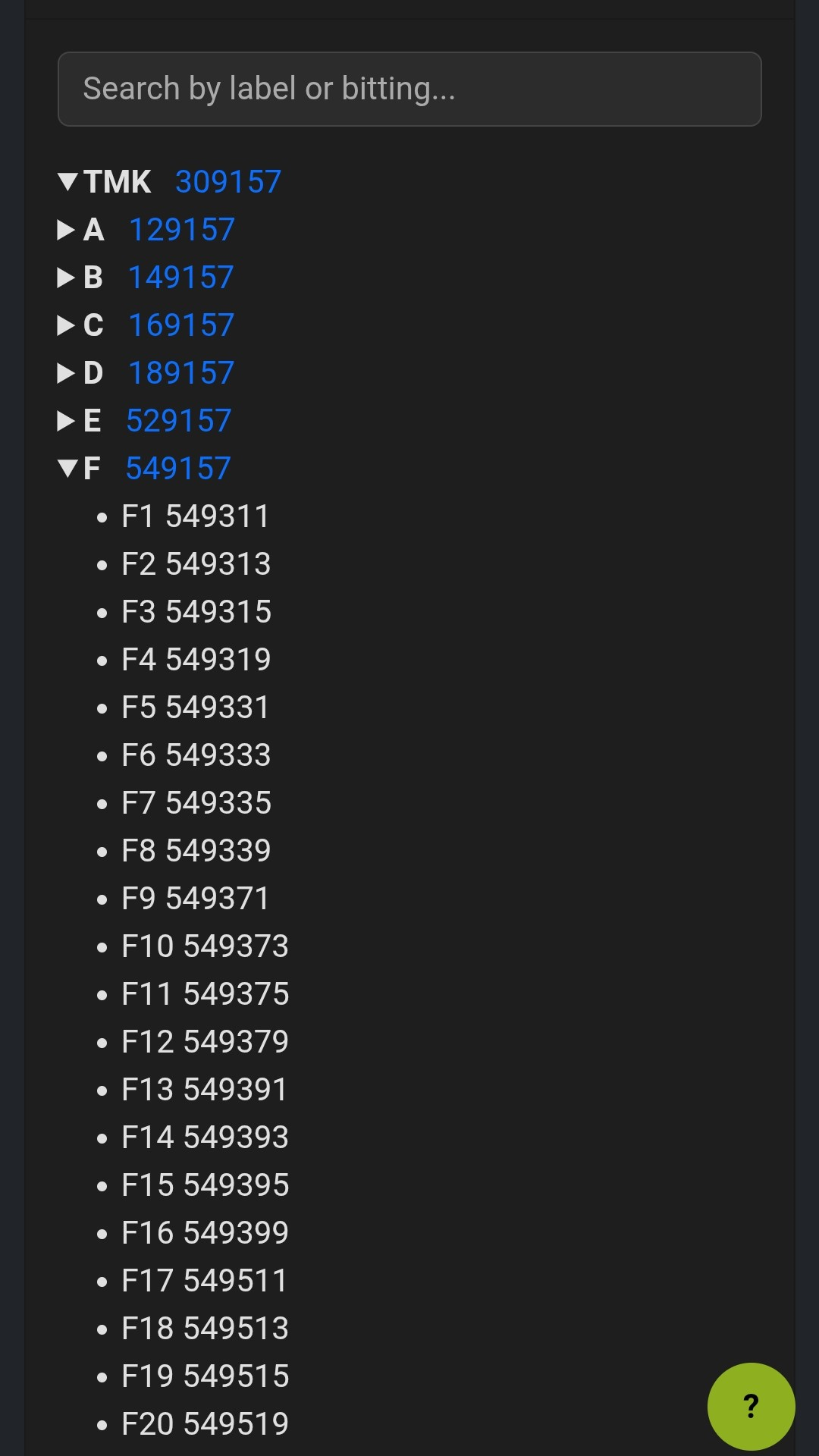
Mobile screenshot of the Project Atlas tree viewer showing expanded system hierarchy.
Search and review the system tree on mobile while keeping key hierarchy and bitting detail readable.
Built For Search. Built For Work.

Master key software, pinstack calculator, and browser-based project recall in one place.

Launch Generator
Mobile Workflow That Still Shows Real Detail
  • Search the hierarchy, inspect pinstack output, and manage pinout sheets from a phone or tablet.
  • Use the same browser workflow at the counter, in your van, at the bench, or on site.
  • JSON reload support preserves project state, running pinout sheets, quantities, and pin totals.
  • When installed or cached ahead of time, Project Atlas can still open and run offline using the last cached app files.
For Locksmiths
Build systems, check pinstacks, and move multiple cylinder pinouts into one copy-ready list for field or shop use while tracking cylinder/core quantities and cumulative pin counts.
For Property Managers
Plan clean master key structures, document system changes, and keep project information organized for maintenance and turnover work. Easily share systems with your locksmith of choice to implement them for you, while maintaining your own records.
Great For Training And Apprentices
Use the generator and pinstack tools as a hands-on reference for learning progression, hierarchy layout, and real-world cylinder pinning workflow. This app presents a free and forgiving software environment you can provide seperately from your shop's usual system generator, providing apprentices a safe place to build, learn, and experiment without the risk of giving them unsupervised access to your system data.

Need Cylinder Pinning Without Building A Full System?

Use the standalone pinstack calculator for manual key entry, quick field reference, or systems created in AND outside of Project Atlas.

  • Manual key labels and bittings for outside systems or bench work.
  • Generator-style pinning rules for standard cores, or small and large format IC workflows.
  • Running clipboard entries with quantities, copy or download output, and cumulative pin totals.
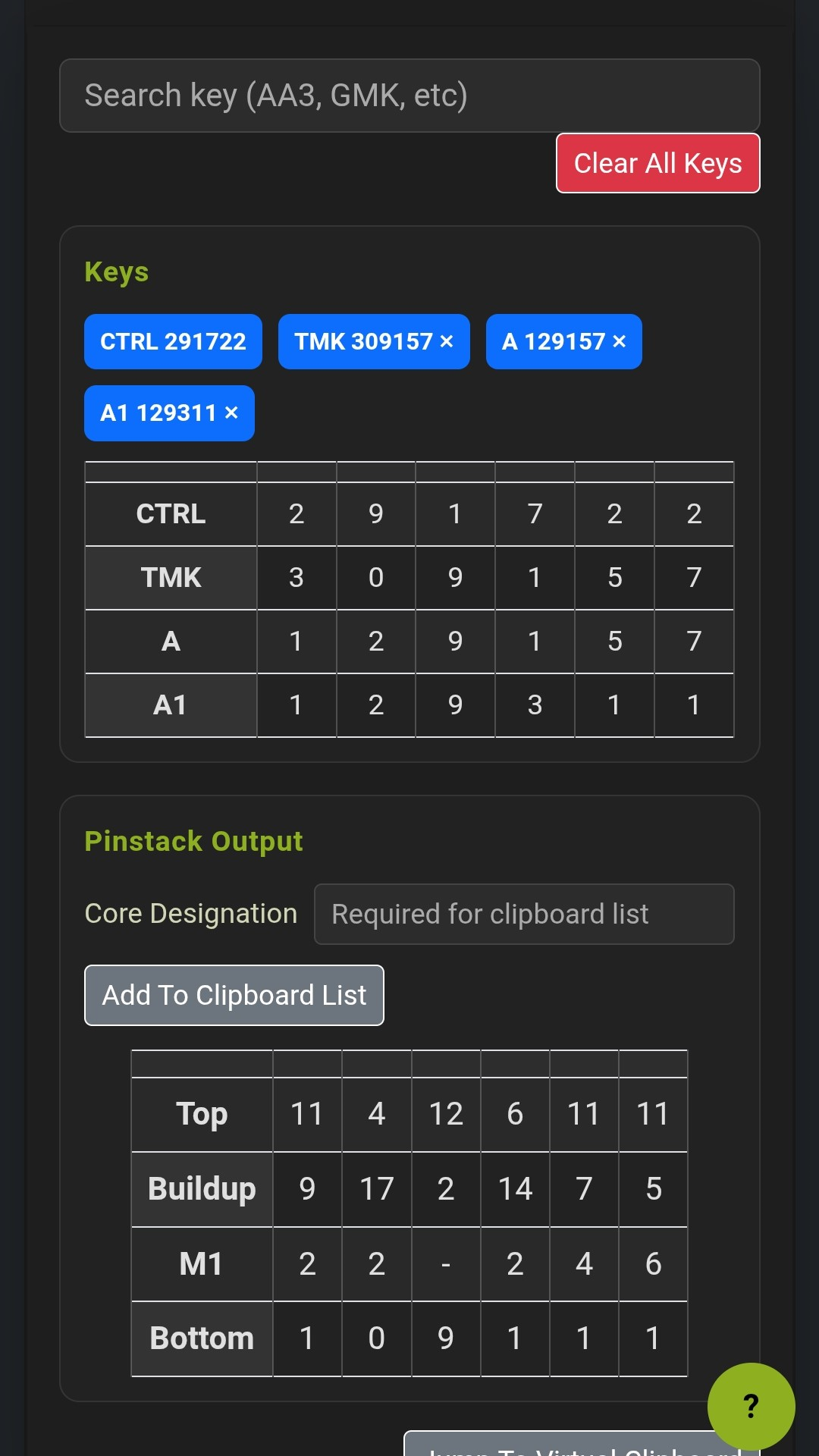
Mobile screenshot of the standalone pinstack calculator with selected keys and generated pin stack output.
Standalone calculator view for quick key entry, pin stack review, and clipboard-ready cylinder output.
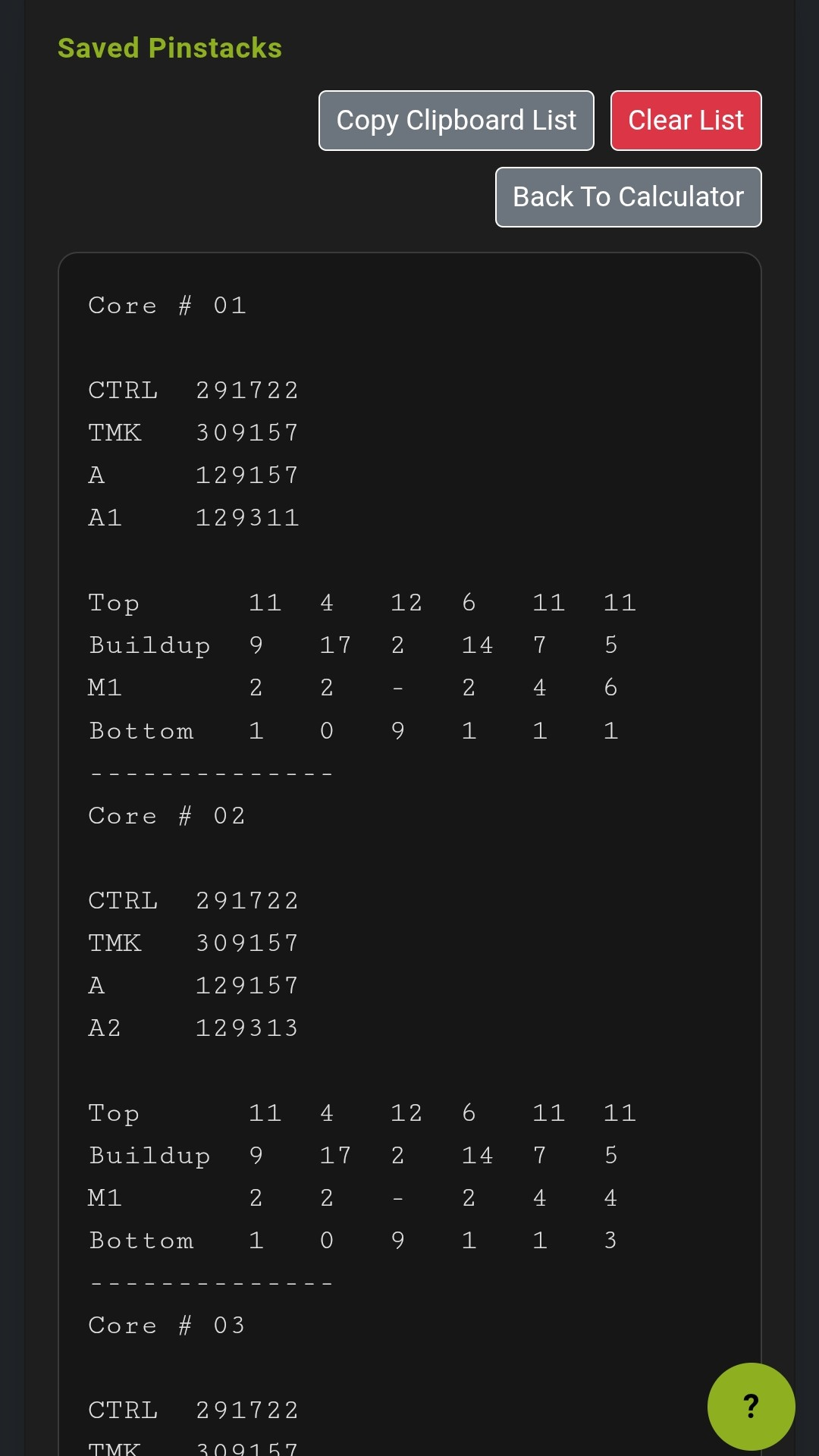
Mobile screenshot of saved pinstacks in the virtual clipboard.
Save multiple core pinouts into a running pinout sheet before copying or downloading the full batch.
Fast. Direct. Built For Real Work.
Manual Key Entry
Add your own key labels and bittings to work with outside systems or for quick bench work.
IC-Aware Output
Automatically handles control-key driven buildup and top-pin output where required. Control can be toggled on/off for systems using mix of IC and conventional cores on same keyway.
Clipboard Ready
Build a running clipboard list of multiple cylinder pinouts, then copy the whole set out in one clean output for the bench or the field, complete with cylinder quantities and running pin totals. Save a JSON file to reload and continue editing later.

Start Building Systems & Pinning Cylinders Now!

Launch the generator for full system design or open the standalone calculator for quick pinning work. Project Atlas stays free in beta, runs on desktop and mobile, can be installed as a web app for offline field access after caching, let's you save and manage system data, export spreadsheet, and save, copy, or download and print pinout sheets, practical for live updates instead of one-time generation.
Universal Progression Chart Tool

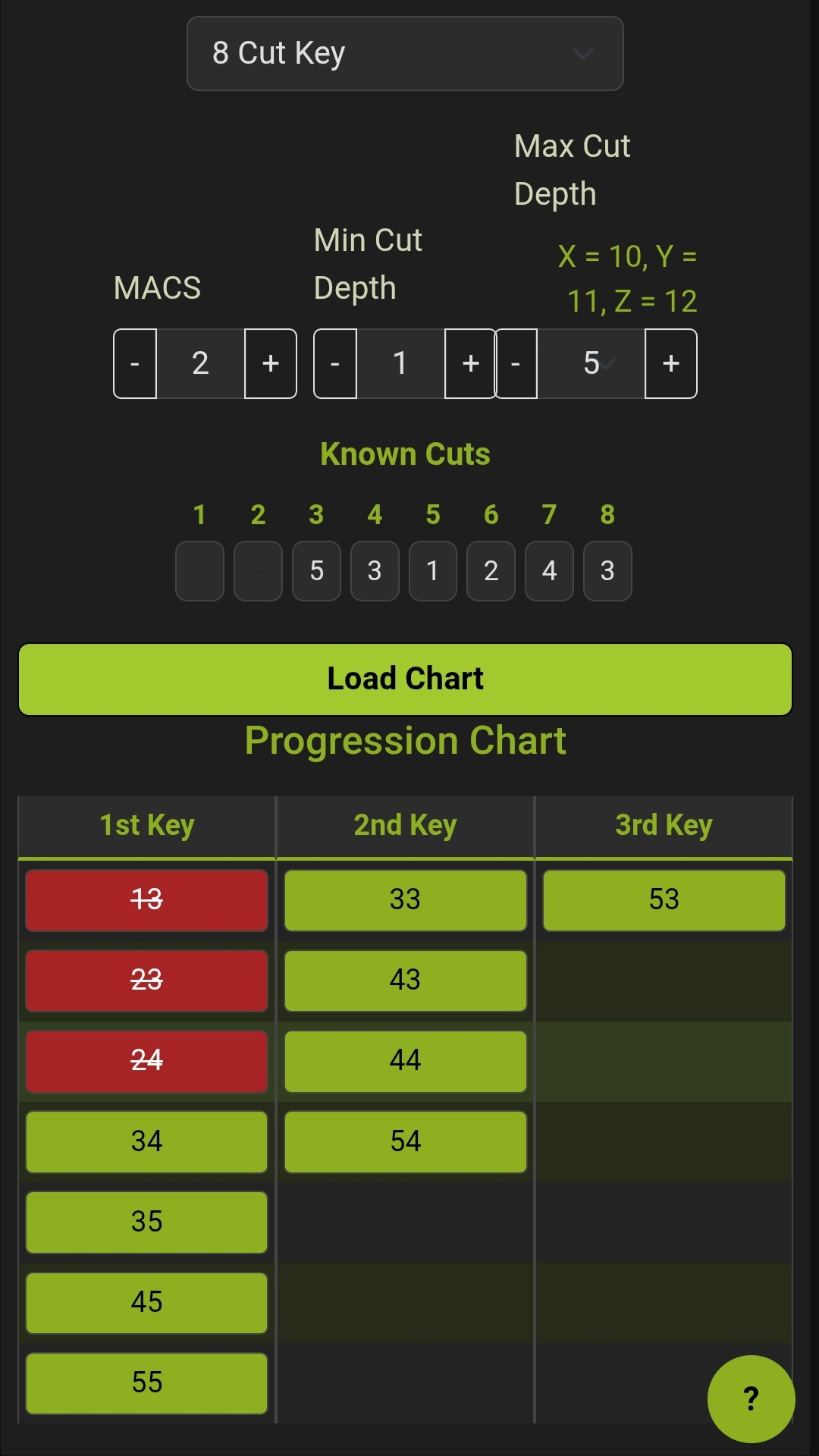
Universal Progression Chart alternate screenshot
Create progression charts for automotive and a variety of other keys, track and save progression progress.
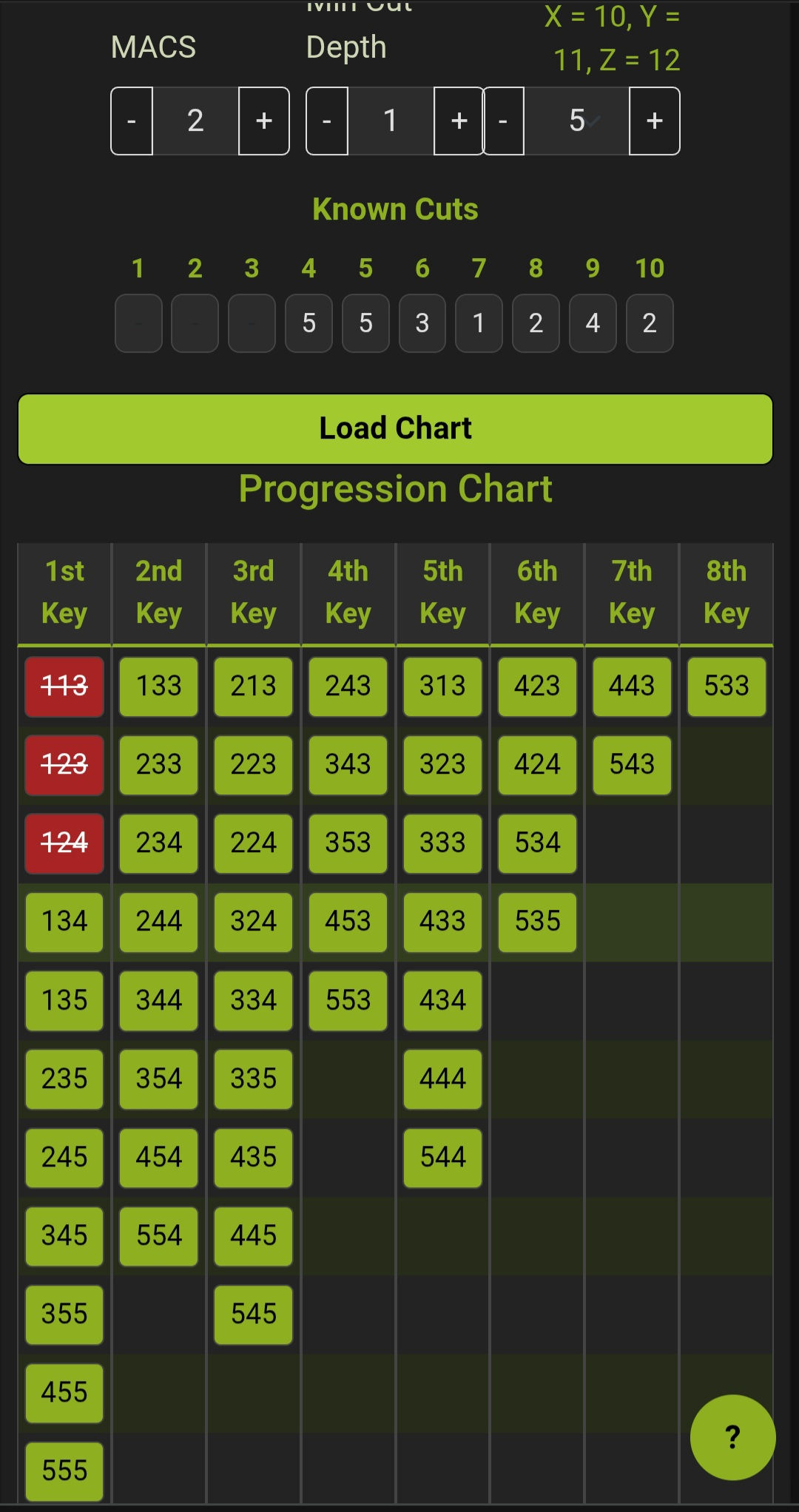
Universal Progression Chart screenshot
Works with keys up to 12 cuts, up to #12 cut depth, up to 12 MACS. Will produce up to a 12 key chart in browser, or export larger progression charts to txt files.

New: Progress Replacement Keys With Partial Reads
The Universal Progression Chart tool is designed to help locksmiths and technicians generate possible key bitting progressions when working with automotive keys or any keyway where only some cuts are known. Enter the cuts you can read, and the tool will chart all valid possibilities for the missing positions—making it ideal for progressing replacement keys when you have a partial read for a key bitting.

Generate universal key progression charts with MACS and cut depth support.
This tool helps locksmiths and professionals quickly generate, save, and reload progression charts for automotive and other keys. Enter known cuts, set MACS and cut range, and get a visual chart of all possible bitting progressions. Mark off eliminated bittings as you go, and save or reload your work as a JSON file.

  • Visual progression chart for missing cuts
  • MACS and cut depth range support
  • Known cuts input and auto-advance
  • Mark eliminated bittings for quick reference
  • Save/load chart state as JSON
  • Mobile-friendly, dark mode UI
  • No server-side data storage
New!

Install Project Atlas For Field Use

Project Atlas can be installed as a web app. After it has loaded once online and the app files are cached, the last cached version can still open and run in dead zones because the calculation logic stays in your browser.

Chrome Or Edge On Desktop
Open Project Atlas in the browser, then use the install icon in the address bar or open the browser menu and choose Install App or Install Project Atlas.
Android
Open Project Atlas in Chrome, tap the browser menu, and choose Install App or Add to Home screen depending on the device and browser version.
iPhone Or iPad
Open Project Atlas in Safari, tap Share, then choose Add to Home Screen. Load the app once while online so the current version is cached for offline use.

Project Atlas User Manual

Open the full user manual for account setup, offline caching behavior, generator workflow, system management, pinstack building, clipboard usage, exports, and project recovery guidance.

Open User Manual